
Your happiest customer, one scan from a review
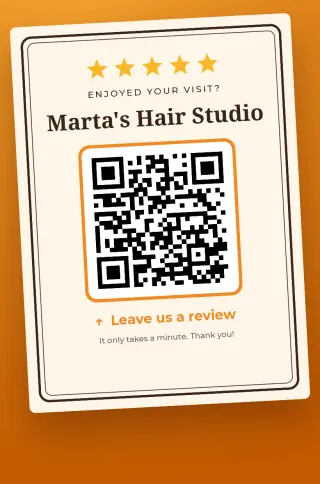
Happy customers rarely go looking for you to leave a review. Put this sign on the counter, and their camera takes them straight to the page.
Make my review signAndroid app. No account, no sign-up: your details stay on your phone.
Why it makes a difference
You catch the moment
They remember you while paying, not three days later. Scan now, and the review says what they just experienced.
No searching
They don't have to type your name or pick between similar businesses. They land on your review page.
And you're easier to find
Google counts review numbers and scores among the signals for its local results. No guarantees, but it matters.
Ready in three steps
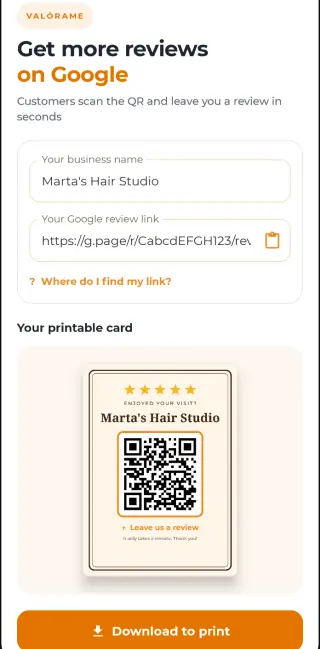
- Type your business name.
- Paste the review link from your Google Business Profile. The app shows you where to find it, step by step, and so does our guide to the review link.
- Download the sign and print it, or share it by message or email.
Signs carry a small Pasarela48 footer. With PRO you remove it, write your own line at the bottom and use the app without ads.
For hair salons, dentists, physios, repair shops, gyms, hotels, realtors, accountants, restaurants and any business with a Google profile.
Ask everyone, and give nothing in return
Google's rules don't allow paying for or rewarding reviews, or asking only the customers you know are happy. A sign in plain view for everyone fits those rules. Here's how to ask customers for reviews without the awkwardness.
Common questions
Do I need a Google profile?
Yes. The sign points to the review link on your Business Profile, and without one there's nowhere to leave a review.
Does the customer need to install anything?
No, just their phone camera. To post the review, Google will ask them to be signed in.
Is Valórame made by Google?
No. It's an independent app with no connection to Google. It just makes a sign from the link you give it.
Can I filter out bad reviews?
No, and you shouldn't. The code goes to your review page, where each customer writes what they like.
Start with the counter. That's where it all happens.
Make my review sign